
Everything a webhook workflow needs
webhook-it does the full cycle — receive, persist, respond, forward — with history and replay built in.
A stable public URL
Create an endpoint once — its URL is yours until you delete it. Register it with Stripe or GitHub without worrying it expires overnight.
Real-time forwarding
Webhooks land on your localhost with every header and body byte intact — signatures included. No copy-pasting into Postman.
History & replay
Every event is saved to a local SQLite database. Replay the exact same payload — same bytes, same signature — with a single keypress.
CLI-first dashboard
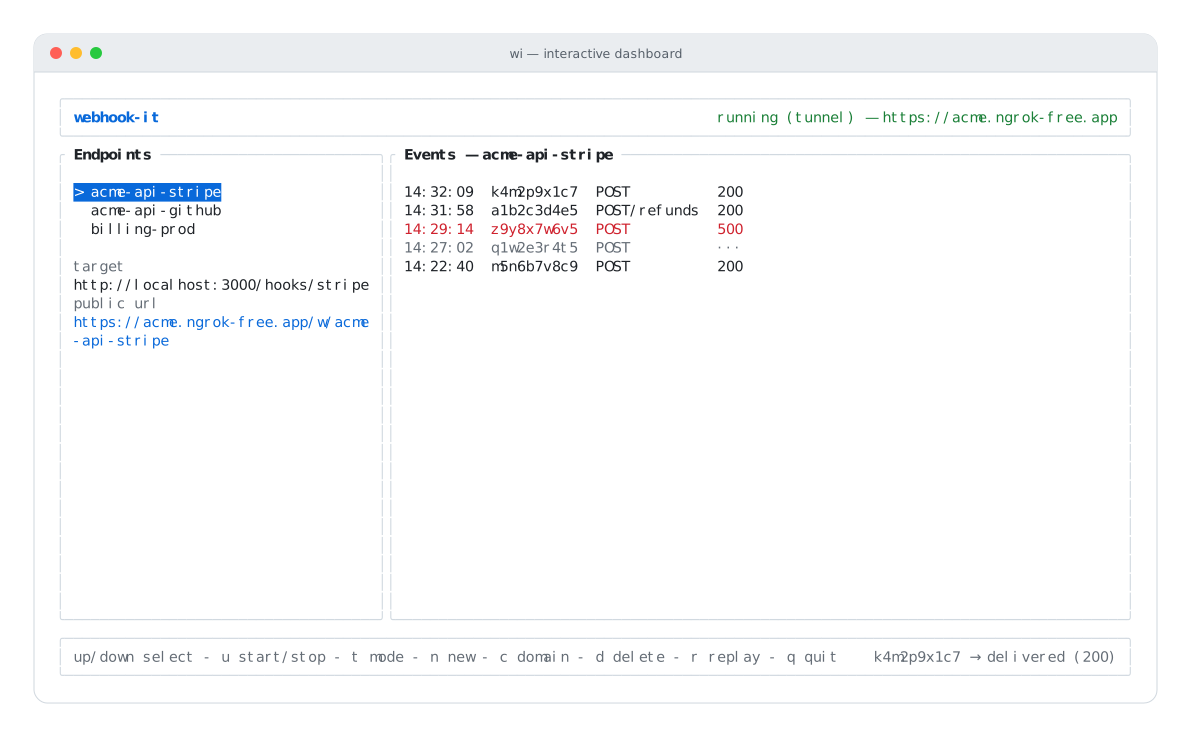
An interactive terminal dashboard. Watch webhooks arrive live, like tail -f — and never leave your terminal.
Project config
Commit a .webhook-it.json and a teammate provisions every endpoint with one command: wi apply.
100% local
No account, no cloud, no server to pay for. Everything runs on your machine; the only external piece is the tunnel.
How it works
One running process hosts both the dashboard and the daemon. No IPC, no background service.
Start the daemon
Press u in the dashboard to bring up the local daemon and an ngrok tunnel. Your public URL appears in the header.
Receive & forward
A webhook hits your stable URL. webhook-it saves it and forwards it to localhost — method, headers and body untouched.
Inspect & replay
Watch events arrive live in the Events pane. When your handler breaks, fix it and press r to replay.
Ready to stop copy-pasting payloads?
Build the binary, open the dashboard, and watch your first webhook arrive in under five minutes.