Events & replay
An event is a single received webhook. It is the unit of history and the unit of replay. Every event webhook-it receives is persisted to the local SQLite database — nothing is ever dropped.
What is stored
Each event captures everything needed to reproduce the request exactly:
| Field | Description |
|---|---|
| id | A short, easy-to-type id (e.g. k4m2p9x1c7). |
| endpoint | Which endpoint received it. |
| method | GET, POST, PUT, PATCH, DELETE, HEAD or OPTIONS. |
| path suffix | Any path after the endpoint name — e.g. /refunds. |
| query | The query-string parameters. |
| headers | Every header, as received. |
| body | The raw body bytes, stored verbatim. |
| received at | When the event reached the daemon. |
| delivered at | When the forward to localhost finished (or null). |
| delivery status | The HTTP code your local app returned (or null). |
| delivery error | The error message, if the forward failed. |
:::info Why the body is stored byte-for-byte
Providers sign the exact bytes of the request body. Stripe-Signature and
X-Hub-Signature-256 are HMACs over the raw payload. Re-serializing the JSON —
even just reordering keys or changing whitespace — would invalidate the
signature. webhook-it stores the body as raw bytes so a forward or a replay
carries a signature your handler will still accept.
:::
The event lifecycle
- Received. The daemon writes the event row. At this point it is permanent.
- Responded. The daemon answers the provider
200 {"id": "..."}immediately — it does not wait for the forward. - Forwarded. Asynchronously, the event is sent to the endpoint's target.
- Recorded. The outcome — a status code, or an error — is written back to the event row.
Because steps 1–2 happen before step 3, the provider's success never depends on your local app being up.
Delivery status
The Events pane shows the delivery status of each event, color-coded:
| Shown | Meaning |
|---|---|
200, 201, 204 … | Your local app responded with this HTTP code. |
400, 404, 500 … | Your app responded, but with an error code (shown in red). |
··· | Not delivered — the forward never got a response (app down, wrong port). |
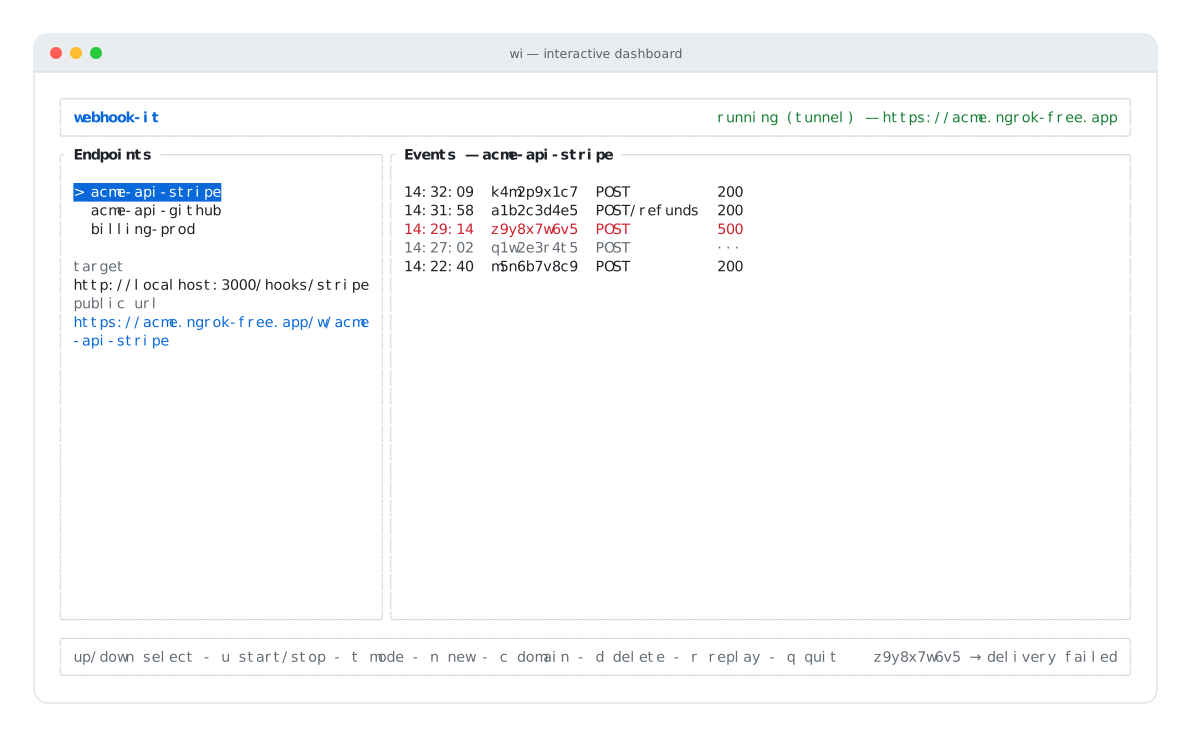
A 500 (red — your app errored) and a ··· (dim — never delivered) among the
events.
:::caution The daemon does not relay your app's response
webhook-it always answers the provider with 200 as soon as it persists the
event. The status column reflects what your local app returned on the
forward — it is for your eyes, it is never sent back upstream. A provider that
needs a specific synchronous response body (e.g. a challenge echo) is out of
scope for the MVP — see the Roadmap.
:::
What gets forwarded
When the daemon forwards an event to your local target, it rebuilds the request faithfully:
- Method — the original method is reused.
- Path —
target URL+ the captured path suffix. - Query — the original query parameters are re-attached.
- Headers — every header is passed through, except hop-by-hop headers
that must not be relayed (
host,content-length,connection,keep-alive,transfer-encoding,accept-encoding). Signature headers pass through untouched. - Body — the raw bytes, for any method other than
GET/HEAD.
Replay
Replay re-sends a stored event to its endpoint's current target — the same method, the same headers, the same body bytes. It is the heart of the debugging loop.
To replay, select an endpoint in the dashboard and press r. webhook-it re-forwards the most recent event of that endpoint and updates its delivery status with the new result.
The debugging loop
A real webhook breaks your handler. The event is already saved. You fix the code, press r, and the identical payload runs again — no re-triggering the provider, no copy-paste. Repeat until it is green.
Replay also rescues an event whose forward failed because your app was down: start the app, select the endpoint, press r.
:::note MVP scope: replay targets the latest event Today r replays the most recent event of the selected endpoint. Per-event selection — picking any event from the history to replay — is on the Roadmap. :::
Next
- Replaying events — the dashboard action in detail.
- Debugging failed events — a full worked example.
- Files & configuration — the SQLite schema events are stored in.