Debugging failed events
webhook-it is built for the moment a webhook breaks something. This guide is a worked example of the debugging loop: spot the failure, replay, fix, repeat.
Scenario
You are building a Stripe integration. Events are arriving — but your handler keeps erroring. Here is how to drive it to green with webhook-it.
Step 1 — Read the delivery status
Select the endpoint and look at the Events pane. The status column is color-coded:
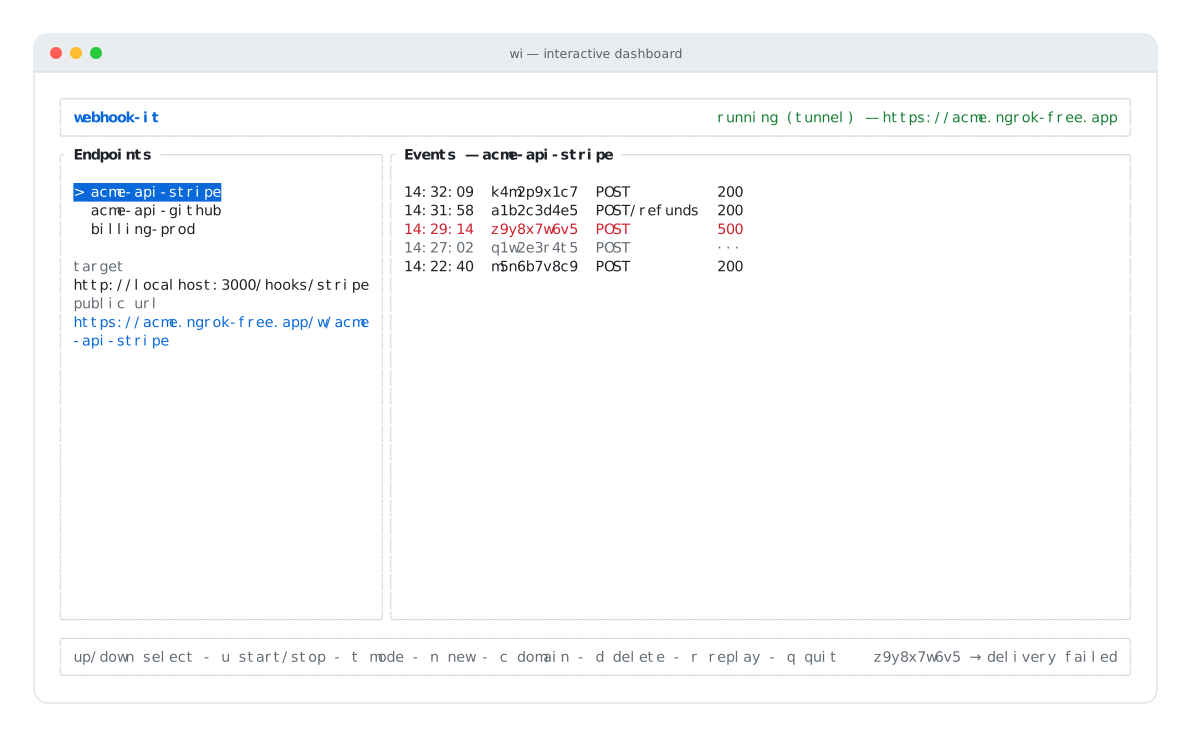
A 500 in red, and a ··· in dim — two different kinds of failure.
| Shown | Colour | What it means |
|---|---|---|
200, 201, 204 | normal | Delivered — your handler accepted it. |
400, 409, 500 | red | Delivered — but your handler returned an error. |
··· | dim | Not delivered — nothing answered the forward. |
The two failure modes need different fixes.
Step 2a — Fix a ··· (never delivered)
··· means the forward never reached anything. The footer status line carries
the reason, usually one of:
| Footer message | Cause |
|---|---|
connect ECONNREFUSED 127.0.0.1:3000 | Nothing is listening on that port — your app is down. |
getaddrinfo ENOTFOUND ... | The target host name does not resolve. |
| timeout / socket errors | The app accepted the connection but never responded. |
Fix the cause:
- Start your local app, or correct the port.
- Confirm the endpoint's target (shown in the Endpoints pane) is right.
- Select the endpoint and press r to replay.
The saved event is re-delivered — nothing was lost while the app was down.
Step 2b — Fix a red status (handler errored)
A red 4xx/5xx means the request did reach your handler, and your handler
returned an error. The bug is in your code. The loop:
- Read your application's own logs to see why it returned the error.
- Fix the handler code.
- Back in webhook-it, with the endpoint selected, press r.
- The exact same payload — same bytes, same signature — runs again.
- The status updates in place. Repeat until it is green.
This is the whole point of webhook-it: you never re-trigger the provider, and you never copy a payload by hand.
Why replay is reliable
A common false failure is a broken signature. Providers sign the raw request body; if a test tool re-serializes the JSON, the signature no longer matches and the handler rejects a request that was actually fine.
webhook-it stores the body byte-for-byte and replays those exact bytes with the original headers. So when you replay, a signature check that would pass in production passes here too — a red status is your bug, not a testing artifact. See Events & replay.
Step 3 — Common situations
"The event isn't even showing up"
If a webhook does not appear in the Events pane at all:
- Is the daemon running? The header must be green.
- Did the provider get an error? In tunnel mode, the daemon must be up for ngrok to forward anything.
- Is the URL exactly
/w/<endpoint-name>? A wrong name returns404and the footer notes webhook for unknown endpoint. - Are you looking at the right endpoint? The Events pane shows only the selected endpoint's feed.
"Replay says no events"
no events for '<name>' yet means that endpoint has received nothing. Replay
needs a stored event to re-send. Trigger one first (a real event, or a curl in
local mode).
Debugging wi apply
When wi apply fails, it tells you exactly why and exits 1:

An invalid .webhook-it.json — every problem is listed with its path.
| Message | Fix |
|---|---|
no .webhook-it.json found... | Run from inside a repo that has the file, or create one. |
... is not valid JSON: ... | Fix the JSON syntax (a trailing comma, a missing brace). |
... is invalid: followed by - path: message | Fix each listed field — bad endpoint name, invalid target URL, etc. |
See Project config schema for the rules every field must satisfy.
Checklist
When something is wrong, run down this list:
- Daemon running? (green header)
- Right endpoint selected?
- Status red, or
···? (handler bug vs. unreachable) - Local app up, on the right port?
- Endpoint target correct?
- Footer status line — what does it say?
- Tried r to replay after fixing?
Next
- Replaying events — the replay action in full.
- Events & replay — the event lifecycle.
- CLI reference —
wi applyerrors and exit codes.