Introduction
webhook-it gives you a stable public URL for every webhook you work with,
and forwards every event — method, headers and body byte-for-byte intact — to
your localhost. It keeps a local history of everything it receives, so you can
replay any event on demand.
It runs as an interactive terminal dashboard. You start it with wi, and
everything happens from the keyboard: start the daemon, manage endpoints, watch
webhooks arrive live, and replay them.
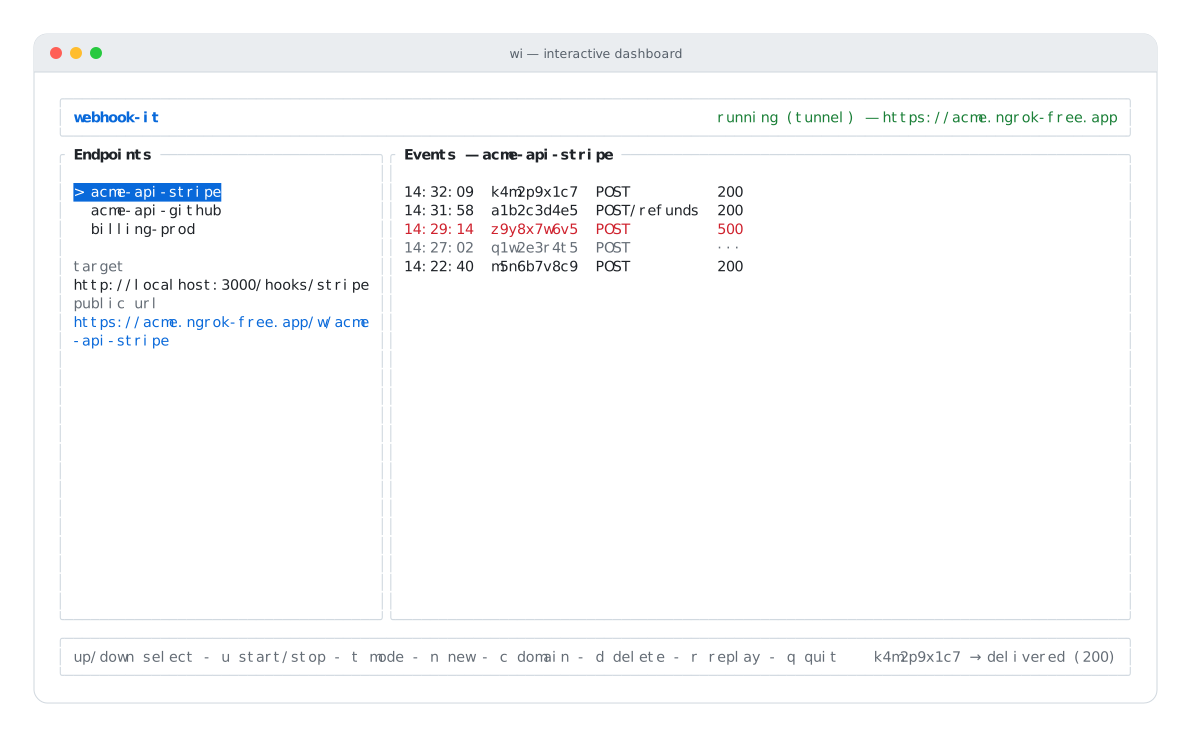
The dashboard: endpoints on the left, a live event feed on the right.
The problem it solves
Testing webhooks during local development usually looks like this:
- Open a temporary-URL service and grab a URL.
- Register that URL with the provider (Stripe, GitHub, Mercado Pago…).
- Trigger the event and watch the payload arrive.
- Copy the payload by hand.
- Paste it into Postman or Insomnia.
- Manually POST it to
http://localhost:3000/webhook. - Repeat for every single test.
That workflow is slow, and it is lossy:
- The temporary URL expires. Register it with a provider today, and tomorrow it may no longer receive anything.
- Headers and signatures get dropped. When you copy a body into Postman, the
Stripe-Signature/X-Hub-Signature-256headers are left behind — and your handler rejects the request, even though the handler is fine. - You cannot reproduce an old event. Once the inbox recycles, it is gone.
- There is no organized history. Several providers all land in one inbox.
webhook-it removes the copy-paste loop entirely. See Motivation in the FAQ for the full story.
What you get
| 🔗 A stable public URL | Create an endpoint once. Its URL is yours until you delete it. |
| ⚡ Real-time forwarding | Events reach localhost with headers and body intact. |
| ⏪ History & replay | Every event is saved locally. Replay the exact bytes anytime. |
| ⌨️ CLI-first | An interactive dashboard. Watch webhooks like tail -f. |
| 📦 Project config | Commit a .webhook-it.json; teammates run wi apply. |
| 🔒 100% local | No account, no cloud, no server. Just an ngrok tunnel. |
How it works in one paragraph
wi opens a dashboard built with OpenTUI
and Solid. Pressing u starts a local daemon inside the same
process: an HTTP server on 127.0.0.1, plus an ngrok
tunnel pointing at it. A webhook arrives at the public URL → ngrok forwards it to
the daemon → the daemon saves it to a local SQLite database and forwards
it to the endpoint's local target. A single tunnel serves every endpoint;
routing is done by path (/w/<name>).
Read the full picture in How it works.
Is webhook-it for me?
webhook-it is built for one persona: a backend or full-stack developer who integrates third-party webhooks day to day.
It is a great fit when you want to:
- Develop a Stripe / GitHub / Resend integration against real events.
- Debug a handler by replaying the same payload over and over.
- Juggle several providers at once without mixing up their traffic.
It is not a fit when you need:
- An always-on receiver — webhooks only arrive while your machine is on and the dashboard is open. See Operational limits.
- A hosted, multi-tenant SaaS — webhook-it is local and single-user.
- A fake-payload generator — it receives real events, it does not simulate providers.
Where to next
- Installation — build the standalone binary.
- Quick Start — receive your first webhook in 5 minutes.
- How it works — the architecture and the flow of a webhook.
- The dashboard — a tour of every pane and key.
:::note Project status webhook-it is an MVP in active development (v0.1.0). The core cycle — receive, persist, respond, forward, replay — works end to end. The Roadmap tracks what is verified and what is still ahead. :::