CLI reference
The wi binary (also installed as webhook-it) does two things: it opens the
interactive dashboard, and it runs the apply subcommand. A couple of flags
print information and exit.
Synopsis
wi                 open the interactive dashboard
wi apply           provision endpoints from .webhook-it.json, then exit
wi --help          print usage and exit
wi --version       print the version and exit
wi with no arguments opens the dashboard. Everything else is headless —
it prints, then exits, without loading the terminal UI.
wi
Opens the interactive dashboard. This is the main way you use webhook-it: managing endpoints, running the daemon, watching events and replaying them — all from the keyboard.
The dashboard's keys are documented in Keybindings. On first run, it also walks you through setting an ngrok domain, and it detects a project config if the current directory has one.
wi apply
Provisions the endpoints declared in the nearest
.webhook-it.json and exits. It is
non-interactive — safe for scripts and CI.
wi apply
How it finds the file
wi apply looks for .webhook-it.json in the current directory and walks up
the parent directories until it finds one — the way git finds .git. So you
can run it from anywhere inside a repository.
What it does
It compares the file against what is stored and reconciles the difference — idempotently. It creates missing endpoints, updates changed targets, leaves matching ones alone, and never deletes.
Output — a fresh apply

webhook-it — applied /path/to/repo/.webhook-it.json
project: acme-api

  + acme-api-stripe  http://localhost:3000/hooks/stripe
  + acme-api-github  http://localhost:3000/hooks/github

2 endpoint(s): 2 created, 0 updated, 0 unchanged

run 'wi' to open the dashboard and start the daemon.
Output — a reconcile with changes

webhook-it — applied /path/to/repo/.webhook-it.json
project: acme-api

  ~ acme-api-stripe  http://localhost:4000/hooks/stripe
  + acme-api-resend  http://localhost:3000/hooks/resend
  = acme-api-github  http://localhost:3000/hooks/github

3 endpoint(s): 1 created, 1 updated, 1 unchanged

note: 1 endpoint(s) under this namespace are not in the file (kept, not deleted):
  ? acme-api-legacy

run 'wi' to open the dashboard and start the daemon.
The marks
| Mark | Action | Meaning |
|---|---|---|
+ | create | The endpoint is in the file but not stored yet. |
~ | update | The endpoint exists; its target differs from the file. |
= | unchanged | The stored endpoint already matches the file. |
? | orphan | Stored under this project- namespace, but absent from the file. Kept, not deleted. |
Errors
wi apply fails fast with a clear message:

| Situation | Message | Exit |
|---|---|---|
| No file found in the directory or any parent | no .webhook-it.json found in the current directory or any parent. | 1 |
| File is not valid JSON | <path> is not valid JSON: <detail> | 1 |
| File fails the schema | <path> is invalid: followed by one - <field>: <message> line per problem | 1 |
The validation rules behind those messages are in Project config schema.
Flags
--help, -h
Prints usage — the synopsis, a description, and the dashboard keys — then exits.
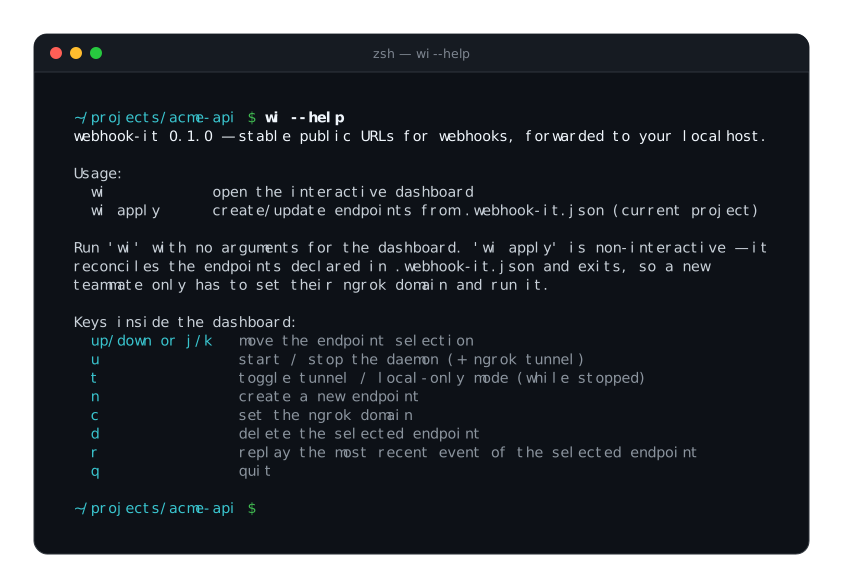
--version, -v
Prints the version and exits:
wi --version
# 0.1.0
Exit codes
| Code | When |
|---|---|
0 | The dashboard exited normally; or wi apply succeeded; or --help / --version printed. |
1 | wi apply could not find or could not validate .webhook-it.json. |
wi apply returning 0 on no changes (everything =) is intentional —
"nothing to do" is success. That is what makes it safe to run repeatedly, and in
CI. See Team workflow.
Next
- Project config schema — the file
wi applyreads. - Files & configuration — where state is stored.
- Keybindings — the dashboard's keys.